The Service Map That Leaves Out the Handoffs
A service map of handoffs helps residents follow a request, understand transfers, and see what information or update should come next.
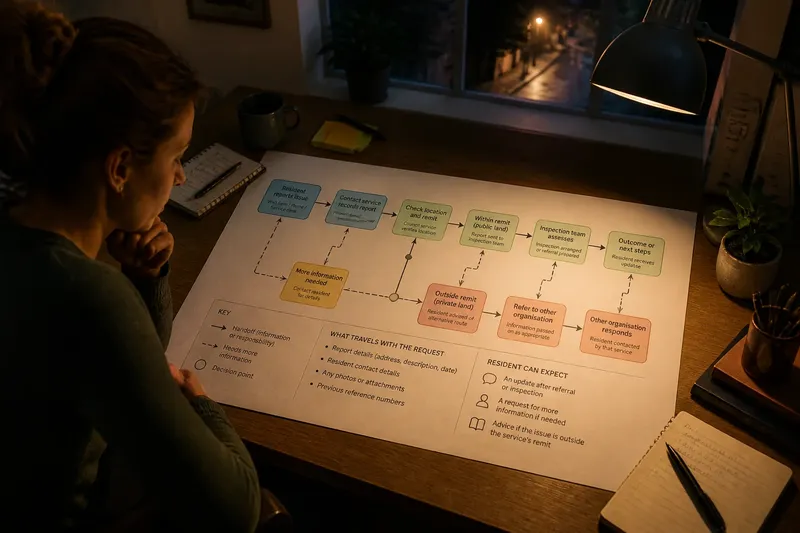
Where does a request go after a resident sends it, and what should they expect at each transfer? A service map of handoffs answers those questions by following the service route—not by tracing who has authority to approve a policy or make a council decision. Residents experience a sequence: they report a problem, someone assesses it, work is arranged, and they receive an update or outcome.
That distinction matters. A decision-authority chart explains who can decide; a service map explains how a request moves through practical work. It should show what triggers a transfer, what information travels with it, and how the resident can tell what happens next. A parcel changing hands is a useful analogy: the route matters, but so does the label that tells the next person what is inside and where it belongs.
Map the resident’s route, not the council’s authority
Begin with the task the resident is trying to complete. Use plain verbs such as “report,” “check,” “refer,” “visit,” and “update.” Add the service or team beside each stage only after the sequence is clear. This keeps the map focused on what happens to the request rather than on internal reporting lines or formal decision powers.
A useful route might begin when a report arrives, continue with a check of its location, and then show an inspection or referral. Mark each handoff separately from the work itself. A stage is an activity; a handoff is a transfer of information or responsibility for the next service action. Label the arrow with what moves, such as a report, referral, appointment request, or inspection result.
Show where the route can pause or branch. A request may need more detail, fall outside the service, or go to another organization. These points explain what a resident can do next. They do not establish who holds legal or policy authority over the issue; that belongs in a separate explanation when relevant.
Choose a map format that answers the resident’s question
A flow map shows the next action
A flow map uses boxes and arrows to show a common route, such as reporting a missed waste collection or requesting a streetlight inspection. Include a decision point when location, urgency, or another condition sends the request in different directions. Without that branch, a simple line can make a variable process look automatic.
A swimlane map shows service transfers
A swimlane map gives each participating service or organization its own lane, with arrows crossing lanes when a request or information moves. Use it when residents need to understand which service receives the request next. Keep out internal units that do not affect the resident’s route; otherwise, the map can start to resemble an organization chart.
A timeline shows sequence and updates
A timeline places events in order and marks points when the resident may receive an update or need to act. It suits a service involving a review, a visit, and a later outcome. Describe the next event without implying a fixed completion date unless the council has approved one to publish.
Explain each transfer without overstating what it means
For each handoff, state who sends the item, who receives it, what information travels, and what the resident can expect to hear if that is known. A short note can clarify the arrow: “The inspection team receives the address and report,” or “If another organization handles the location, the council explains the referral route.”
Choose verbs that describe observable events. “Sent” means a transfer took place; it does not mean the receiving service accepted or completed the request. “Reviewed” does not mean approved. Show a later update or check where one exists, and distinguish a referral from completed work.
Say a council is mapping a neighborhood drainage complaint. In this invented situation, the starting input is a resident’s report with a street location but no information about whether the drain is on public land. The mapper lays out the route: the contact service records the report, a council service checks the location, and an inspection team receives the report if the site is within its remit. The resulting map shows a branch: if the location is public land, the inspection route continues; if it is privately owned, the resident is told which route to pursue instead. The tradeoff is clear: the map explains the next service action, but it does not promise that the drainage problem will be fixed or decide who has authority over the land.
Include what happens when information is incomplete, the request is outside the service, or the resident disagrees with an outcome. These branches can point to adding details, contacting another service, or asking about a review. Keep the wording neutral so a route change clarifies options rather than blaming someone for choosing the wrong channel.
Check the service map before publishing
- Starting channel: Check whether the map names the usual web form, phone line, or service desk. If it does, residents can identify where to begin; if it does not, add the correct contact route.
- Transfer label: Check whether each arrow names the information or request being passed on. If it does, keep the label; if not, add the item so the handoff is understandable.
- Receiving service: Check whether the next service is named where that information is settled. If it is, retain the name; if it is not, verify the route with service staff before publishing it.
- Decision branch: Check whether a condition such as location or urgency changes the route. If it does, show the condition and both paths; if the condition is unknown, confirm it before presenting a single route.
- Resident update: Check whether the map says who communicates after a referral, review, or visit. If that contact is known, name it; if it is not, avoid implying an update and clarify the published service information.
- Exceptions: Check whether missing details or out-of-scope requests have a route. If they do, explain the next action; if they do not, ask the service to define one rather than leaving residents at a dead end.
- Plain language: Check for internal abbreviations and unexplained service terms. If a term is necessary, define it; if it adds no useful information, replace or remove it.
- Accessible version: Check that the route is available as readable text as well as a graphic. If it is, make both easy to find; if it is not, provide a text description so the diagram is not the only source of the service information.
What do residents need to know about service handoffs?
Should every team appear on a service map?
No. Include a team when it changes the resident’s route, the information needed, or the next service action. Leave out back-office units unless naming them explains a transfer that would otherwise be confusing.
How should a referral to another organization appear?
Name the receiving service if its role is confirmed, and explain what is sent or what the resident must do next. If the route depends on the issue’s location or type, show that condition instead of presenting the referral as automatic.
What should a map do when a service has several routes?
Show the common route and label branches for meaningful differences such as urgency, eligibility, or ownership. If the branches become hard to follow, use separate maps for distinct resident tasks and connect them where the routes diverge.
When should a council review its service map?
Review it when a published process, contact route, service boundary, or transfer changes, and when residents repeatedly ask where a request has gone. A staff member can check that the route matches current practice, while a resident-facing reviewer can flag wording that only makes sense inside the council.
Keep the published route readable and current
Assign someone to maintain the public explanation when contact channels, referral arrangements, or service processes change. That person needs access to the current route and a way to update the public version; the service map need not become a chart of council oversight or decision authority.
Publish an accessible text version alongside the graphic. Headings can make a long route easier to scan, and a short description can communicate the same sequence to people who cannot use the diagram. If the map appears on a noticeboard or printed handout, provide a simple route to the fuller service information.
A good service map of handoffs lets a resident locate a request in the route, understand why it may move, and identify the next useful contact or update. Keep the boundary clear: map the service journey, and use a separate explanation for who has authority to make decisions.